Saturday, April 20, 2013

A Visual Approach to Sketched Symbol Recognition


In their paper, Tom Y. Ouyang and Randall Davis present a visual recognizer that uses what the researchers called the, "Image Deformation Model" that compares each point in a given image in a 3x3 local window to a  corresponding window in a template image. Each point has values from a set of 5 features:

  1. Horizontal Orientation of Stroke at Point
    • 0 degrees
  2. "Forward Slash" Diagonal Orientation of Stroke at Point 
    • (Note: "Forward Slash" is a term that I have assigned)
    • 45 degrees
  3. Vertical Orientation of Stroke at Point
    • 90 degrees
  4. "Back Slash" Diagonal Orientation of Stroke at Point
    • (Note: "Back Slash" is a term that I have assigned)
    • 135 degrees
  5. Endpoint
    • 1.0 if the point is an endpoint of a stroke
    • 0.0 if the point is not an endpoint of a stroke
The points that are given these features values are the output points after a normalization process where the strokes are resampled, scaled, and translated for temporal, scale, and position invariance, respectively. Ouyang and Davis do their scaling after translating the center of mass to the origin (0,0). Their scaling works by constraining the scaling along a unit standard deviation outward from the center along both axes.

The actual IDM distance (D^2) computed between the input stroke to the templates is computed by the following equation:
  • D^2 = Sum for every point x and y ( min of dx or dy from ( ( || I1(x+dx, y+dy) - I2(x, y)^2 || ) ^2)
    • where dx and dy represent pixel shifts
    • where Ii(x,y) represents 3x3x5 features values in Ii from the 3x3 patch centered at point(x,y)
Ouyang and Davis perform several optimization to reduce computation time including Coarse Candidate Pruning where only the N nearest neighbors of a coarse metric are passed to be computed by the IDM model. After taking the first K principle components of the image, it uses those K components to compute the following coarse metric:
  • Dhat^2 = sum from k = 1 to K ( v1(k) - v2(k) ) ^2
    • where vi(k) is the k-th principle component of the i-th image.
The second optimization is a hierarchical clustering optimization that uses a branch and bound technique to apply agglomerative hierarchical clustering to each training example. Each class's examples are grouped on a complete-link distance and are then merges the two nearest clusters until only one cluster exists for the class. The resulting hiearchical tree is used to choose the cluster center as the representative template and uses that to find the maximum distance between the other clusters to use as the "cluster radius," rc. This radius is used to choose whether to ignore a given class of training examples by determining if the center radius, dc, minus the cluster radius, rc, is larger than the best distance the IDM comparison has found so far. If it is, the entire cluster is ignored, lower computation time. 

Rotational invariance is obtained by comparing 32 rotated versions of the input sketch to the templates that pass the hierarchical clustering optimization. 

The researchers tested their IDM based recognition on 3 datasets and achieved the following accuracy rates and rankings to other recognizers:
  1. Pen Digits, 99.2%, 2
  2. HHReco, 98.2%, 1
  3. Circuit Diagrams, 96.2%, 1
For the pen digits dataset, the algorithm ran in 8.1 ms which was the second fastest time where the fastest was 2.4 ms and the 3rd fastest was 40.8 ms.

The description of the optimization and the scaling were particularly interesting for this recognition scheme. It's also funny how well their distance recognition performs with only 5 features for a given point, 4 of which are orientation.

Reference:
Tom Y. Ouyang and Randall Davis, "A Visual Approach to Sketched Symbol Recognition", Proceedings of the Twenty-First International Joint Conference on Artificial Intelligence (IJCAI-09), pp 1463 - 1468, Pasadena, California, USA, July, 2009

Envisioning Sketch Recognition: A Local Feature Based Approach to Recognizing Informal Sketches


This paper was Michael Oltmans' thesis and was written in 2007 at the Massachusetts Institute of Technology. Unlike the other papers that have been presented in this blog, this approach is a vision based approach that uses a sliding window called a "bulls-eye" that is split like a darts target into concentric rings with radial splits. The outer ring's sections are larger than the inner rings (on a logarithmic scale) to represent that the points in the middle are in the "focus" / center of the fovea and more important than points that fall in the inner rings.

Oltmans makes the shapes found by the bulls-eyes rotation invariant by aligning the shape so that the stroke direction points to the right along the x-axis. In the event that the determined direction of the stroke is wrong, Oltmans also flips the stroke direction and aligns that with the x-axis. To prevent the stroke's points from falling on either side of the bullseye's horizontal bins and damaging the comparison. The bullseye is rotated so that a single wedge (bin) takes up the horizontal bin. The stroke direction itself is found using a sliding window of 19 points on which an orthogonal distance regression finds the best-fit line. Shapes in the bullseye are normalized for scale invariance so that they are 75 pixels wide and tall. The strokes within the shape are also processed so that the points in the sketch have a pixel distance of at least one,  and are also resampled.

Oltmans' recognition scheme is temporally invariant (stroke order doesn't matter) since the entire figure will be brought into focus and preserve the context of the figure.

The bulls-eye uses a histogram based scoring method to compare the part of the sketch it has in focus to other template bulls-eyes of other shapes. For this comparison, he uses the following distance metric:

  • Sum( (Qi - Pi)^2 / (Qi + Pi) ) 
    • where the Qi is the number of points in the input bulls-eye and Pi is the number of points in the template bulls-eye.
Oltman used his bulls-eyes method to find shapes in circuit diagrams that included the symbols for resisters, batteries, grounds, and current sources (see figures below).
image002pc3.jpg


To determine which figures should be focused on, i.e. which contexts/shapes to perform recognition on, Oltman moves along each stroke and adds a candidate context every 10 points along the stroke. This process is repeated for larger and larger windows to find shapes drawn at different sizes. The system then breaks down the shape by classifying some candidate regions as wires that don't match any other kind of shape.  The other candidate regions are then either combined or split into candidate regions that are processed by the bulls-eyes for final classification.  This initial set of clusters is found using an expectation maximization clusterer. The clusterer is given a vector of each candidate region's top left and bottom right corners which are weighted by the square scores of each candidate region. The clusterer outputs the mean and standard deviation of the four coordinates which are used to find a mean candidate region to be used as a new region for shape prediction. These clusters of new regions are then split if they are too large as determined by the standard deviations from the clusterer. Any remaining overlapping regions are chosen between by greedily choosing the highest weighted cluster.

Finally, predictions are made on the remaining clusters and the highest scoring clusters are chosen for any remaining overlapping clusters and the rest of the clusters are thrown away within a given set of overlapping clusters. This proceeds until all regions have been classified.


Reference:
Michael Oltmans, "Envisioning Sketch Recognition: A Local Feature Based Approach to Recognizing Informal Sketches", Massachusetts Institute of Technology, 2007

Tuesday, April 9, 2013

ShortStraw: a simple and effective corner finder for polylines


In this paper, Wolin et al. discuss their ShortStraw corner finding algorithm.

Their algorithm is based on finding where "straws" connections between the endpoints in a window of points, bridge gaps.

Formally:

  •  a straw at point i = distance(point i-w, point i+w) 
    • where w = 3, an empirically determined constant for best results

After resampling (which normalizes the straw lengths), their algorithm uses a bottom-up approach to build a set of initial corners followed by a top-down approach to refine or add to the existing set of found corners.

Bottom-up stage: 

  • Compute the straws for all points
  • Find the median straw (distance)
  • Set threshold t = median * 0.95
  • Check for Additional Corners:
    • For each (Straw straw : Straw)
      • if( straw < threshold )
        • corners.add( corresponding point for straw )

Top-down stage:

  • Additive Co-linear check:
    • for each( pair of points in corners)
      • if( pair of points does not form a line [i.e. r <= 0.95])
        • Check for Additional Corners between the pair of points 
          • with relaxed threshold, t
  • Reductive Co-linear check:
    • for each( triplet of points in corners)
      • if( triplet of points forms a line [i.e. r <= 0.95] )
        • remove middle point from triplet of points
where r = distance(points,a,b) / path-distance(points,a,b)

Results
The shortstraw recognizer, when run on 244 different polyline shapes, identified 97.9% of actual corners as corners (Correct Corners Accuracy). More importantly, their recognizer achieved an "All-or-Nothing Accuracy" of 74.1% which means that the Shortstraw recognizer perfectly recognized all the corners as corners and did not mis-classify any of the non-corners as corners for 74.1% of the strokes.

This is impressive considering that the Sezgin and Kim recognizers had Correct Corner Accuracies of 82.4% and 79.0%, respectively and All-or-Nothing Accuracies of 27.8% and 29.7%.

Even better than that, the algorithm is simple and competitive in term of the computation time and resources required to run it.

It's encouraging to see simple ideas outperform the more advanced methods. Simplicity can be beautiful at times.

A. Wolin, B. Eoff, and T. Hammond. 2008. ShortStraw: a simple and effective corner finder for polylines. In Proceedings of the Fifth Eurographics conference on Sketch-Based Interfaces and Modeling (SBM'08), Christine Alvarado and Marie-Paule Cani (Eds.). Eurographics Association, Aire-la-Ville, Switzerland, Switzerland, 33-40. DOI=10.2312/SBM/SBM08/033-040 http://dx.doi.org/10.2312/SBM/SBM08/033-040

Saturday, April 6, 2013

A Domain-Independent System for Sketch Recognition

In this paper, Yu and Cai, discuss their system which was designed with the following goals:

  • Naturalness
    • It must allow users to draw in a natural way just as how they do on paper.
  • Consistency
    • It should produce a consistent recognition result,
      • i.e. if a user wants to sketch a line segment, no matter if it is drawn with a single stroke, or more than one stroke, or a compound stroke which contains other primitive elements, the system should interpret it as a line segment.
  • Hierarchical Composition 
    • It should understand the hierarchical relations among the recognized graphic objects. 
      • For example, a stroke which is composed of several primitive shapes may serve as a constituent part of some more complex object.
  • Beautification
    • It should try to guess what the user intends to draw and turn the imprecise strokes into regular objects. 
      • Although domain-specific knowledge may be very helpful here, some simple decisions can still be made according to low-level geometric features only.
  • Editing Support
    • Besides a fairly high recognition rate, it should provide an efficient and convenient user interface for drawing modification as well.
  • Modularity
    • It can be easily integrated as in input module into other more complex systems.
Their system was divided into two stages:
  1. Imprecise Stroke Approximation
    • Vertex Detection and Primitive Recognition
      • Procedure: For every stroke,  check to stroke to see if primitive. Stop if it is, else cut the stroke at the point of highest curvature (corners) and perform primitive check on these two strokes. (recursive)
    • Primitive Detection: Lines, Curves, Circles, Ellipses, Squares, Spiral (referred to as 'helixes' in the paper)
    • Discussed Topics
      • Line Segment Approximation
        • Computes the least-squares best fit line for the direction curve or coordinates of points of the stroke and whether the number of deviation points is "small" with a threshold. If it is, then guess line segment and verify with feature area verification, else, delay classification.
        • "Feature Area Verification" - checks the ratios between feature and standard area; Serves as a constraint to local criteria for line segment recognition on strokes that are based on direction and curvature information.
      • Curve Approximation
        • Do circle and ellipse approximation
          • Circle: check if direction curve can be approximated with a line with a slope of 2pi / n. If so, guess circle with center as the bounding box center and mean distance from center as the radius. Verify with feature area verification.
            • Overtracing is handled by breaking each 2pi revolution of the direction graph into separate circles and combining them by taking the mean features of the circles.
          • Ellipse: "similar to circle" with extra constraint : area is symmetrical about major and minor ellipses.
            • A dubious claim, according to Dr. Hammond
          • Arc Stroke: Direction curve is approximated by line with slope *less than* 2pi / n.
      • Self-Intersecting Stroke Handling
        • If stroke can't be broken down into primitives and it has intersecting lines, make two copies of the stroke and divide them using two strategies:
          1. At self intersection points
          2. At points of maximum curvature
        • Choose the one with the "better" recognition 
2. Post Processing
    • Eliminates elements made by noise in data, beautifies remaining elements, do domain-independent recognition.
    • Steps: 
      • Simple Relation Retrieval
      • Cleanup
      • Basic Object Recognition
Their user interface also allowed for editing by going into a "modification state" and entering editing command symbols which included "delete","undo", and "redo".

The system was evaluated with only 10 students (totally :p) who thought that the system "was easy to use".
The students entered a set of primitive and hybrid shapes.

"Correct Rate":
  • Primitive Shapes: 98%
    • Arcs: 94%
  • Hybrid Shapes: 70%
    • Smooth connections in hybrid shapes were hard to detect.

The paper's evaluation was, qualitatively and quantitatively, extremely weak. Simply saying that system was easy to use is ambiguous. How was it easy to use? What parts did they like? Did they ask if they didn't like anything? Perhaps using a likert scale questionnaire would give a more solid grasp of user satisfaction. How long did they use it for? What the evaluation so short they couldn't find anything wrong about the system?

They only tested on 10 students and no mention was made of how many shapes the users each had to enter. Their correct rate metric is a little vague and not a standard measure for recognition performance.

The paper also erroneously calls spirals "helixes" and there were many spelling and grammatical errors that distracted from the paper.
Ex: "We has devised a function..." (Can they has chzburgers?)
Ex: "There were totally 10 students..." (Did a surfer write this paper?)
Ex: "the curvature curve..." (This happened a lot in the paper and it is really redundant.)

Don't get me wrong, they had some smart ideas. Their method of recognizing overtraced circles was very clear and concise  and their method of breaking strokes down at high curvature vertices makes perfect sense.

Bo Yu and Shijie Cai. 2003. A domain-independent system for sketch recognition. InProceedings of the 1st international conference on Computer graphics and interactive techniques in Australasia and South East Asia (GRAPHITE '03). ACM, New York, NY, USA, 141-146. DOI=10.1145/604471.604499 http://doi.acm.org/10.1145/604471.604499

Friday, April 5, 2013

Mechanix : Sketch Recognition Algorithms for Comparing Complex and Unpredictable Shapes


In this paper, Field et al. discuss their software platform called, "Mechanix" which is designed to help teachers publish and grade course material that students submit to online in the form of sketches.

The main subject domain that their recognition system is used for is in the recognition of free body diagrams, primarily trusses, for engineering courses at Texas A&M (whoop!).

Their recognizer uses a single example provided by a professor, teacher, or TA as the training data that the student's input data (truss drawings) are compared to for grading. Rather than give a confidence or break down the results, the recognizer simply returns a correct or not correct response.

Body Identification
The free body input is also checked to see if the bodies are indeed closed shapes. This is done by traversing the stroke segments' endpoints and finding the closest endpoints to check if those endpoints are within 9% of the total path length to each other. After all end points are checked, the start and end point are checked to see if they are close enough. If all conditions pass, then the shape is closed shape

Body Comparison - Tanimoto + Hausdorff
Field et al.'s algorithm works by preprocessing the stroke for temporal invariance, rotational invariance, scale invariance, and position invariance similar to the preprocessing in $1.

Then, the Tanimoto coefficient, Hausdorff, and Modified Hausdorff distances are computed and combined to give a "matching" or "not matching" response if the confidence is greater than the acceptance threshold of 65%.

Hausdorff Distance:
  • Haudorff Distance(A, B) = max(max(Da),max(Db))
    • where Da = min (distance from a to b)
    •            Db = min (distance form b to a )
      • where a and b are points in point vectors Pa and Pb from the input (A) and training (B) points, respectively
  • Modified Hausdorff(A,B) = Va + Vb / 2
    • where Va = avg(Da)
    •           Vb = avg(Db)

Tanimoto Coefficient:
  • Normally: T(A,B) = numPts ( A & B ) /  numPts(A) + numPts(B) - numPts(A & B)
  • Mechanix: T(A,B) = numPts(A & B) + numPts( B & A) / numPts(A) + numPts(B).

Truss Identification
Trusses are identified by finding intersection that share edges with 3 three distinct paths connecting them.

Field et al. achieved recall rates of 0.991 and a precision of 0.691.
While the precision seems low, but the high recall rates is what is really important since the recognizer needs to be able to verify correctness of the sketches and recognize correct trusses as such.

The high recognition rates for general symbols with Tanimoto and Hausdorff is impressive and its great to see a strong practical application of sketch recognition towards education. Knowing what's important for the domain was a strong point of the paper.

Martin Field, Stephanie Valentine, Julie Linsey, and Tracy Hammond. 2011. Sketch recognition algorithms for comparing complex and unpredictable shapes. In Proceedings of the Twenty-Second international joint conference on Artificial Intelligence - Volume Volume Three(IJCAI'11), Toby Walsh (Ed.), Vol. Volume Three. AAAI Press 2436-2441. DOI=10.5591/978-1-57735-516-8/IJCAI11-406 http://dx.doi.org/10.5591/978-1-57735-516-8/IJCAI11-406

Sunday, March 24, 2013

The Word-Gesture Keyboard: Reimagining Keyboard Interaction


In this paper, Zhai and Kristensson discuss their Word-Gesture Keyboard which allows users to drag their finger in a single stroke across a touch screen keyboard to input a word. Their keyboard uses a probabilistic model to provide a possible-word menu from which the user can select their desired input.

Zhai and Kristensson first describe the requirements for the widespread acceptance of a new text input method:

  1. High Speed of Input
  2. Minimal Cognitive Load
  3. Support for the Development of Efficiency

From there, the researchers discussed the feasibility of a gesture based text input method. They note that English, like nearly all natural languages, feature a high degree of regularity and redundancy and that the average word length is only about 4 to 5 characters. Longer more complex words can still be entered through the striking method so all words can be entered by users despite their particular skill or accuracy in using the keyboard. Essentially, SHARK (short-hand aided rapid keyboarding) is really an improvement of the existing keyboard. The probabilistic recognition of matching words in the English lexicon also reduces the impact of inaccurate input caused by the fat finger problem.

Since the user doesn't have to lift their finger, the input is generally takes less time than tapping.
Their keyboard input method does not require any training which is a must for any new text input method. Since most input is done for a small set of commonly used words, these common words' input paths are easily remembered through procedural/muscle memory which further improves input speed. This training allows users to progressively become more efficient which is a positive mark of a  "progressive user interface."

Their keyboard also has features common system commands...

  • to change the case of the word before the caret to further decrease time to input and minimize user frustration.
  • to copy and paste
  • to switch languages (lexicon search and different character input sets)

Zhai and Kristensson performed several experiments to test...

  • recall rates without visual feedback (looking at the keyboard) across multiple sessions
    • resulting in about 13 words remembered for the 1st session to 45 to 57 words remembered for the 4th session
  • entry rates (speed) for initial performance with varying amounts of time to practice on QWERTY and ATOMIC keyboards
    • resulting in 7 to 13 wpm for ATOMIC and 15-25 wpm for QWERTY
  • maximum performance for small set of text inputs recorded in the form of a competition
    • with an average error-free performance of 57.5 wpm and top performance of 99 wpm

A subjective evaluation was also conducted with responses and comments gathered from their official release with the Apple App Store for the iPhone. Responses were 81.6% completely positive, 12.5% somewhat positive, and 5.9% completely negative.

Given the limited input space touch screens for mobile devices, it is impossible to use the standard two handed typing for which the DVORAK keyboard was designed. As such it makes sense to explore less traditional methods of keyboard input and to attempt to ease input for these devices, especially in light of their widespread use. Zhai and Kristensson's work is a great work that does just that with the grounded scientific work and forethought given to it that such work deserves.


Shumin Zhai and Per Ola Kristensson. 2012. The word-gesture keyboard: reimagining keyboard interaction. Commun. ACM 55, 9 (September 2012), 91-101. DOI=10.1145/2330667.2330689 http://doi.acm.org/10.1145/2330667.2330689

A Few Useful Things to Know About Machine Learning


In this article, Pedro Domingos attempts to reveal the "Folk Knowledge" and "Black Art" commonly used in machine learning.

First Domingos provides some key insights about machine learning:

  • Machine learning allows the program to generalize rules from examples. This saves programmers time by not having to explicitly program rules. Cost savings are increased for larger data sets.
  • Using machine learning techniques successfully requires information not easily found in formal information sources. i.e. "Black Art" is abundant in the field.

These insight entailed in this "Black Art" is revealed by Domingos in 12 lessons:

1st Lesson: Learning = Representation + Evaluation + Optimization:

  1. Representation
    • Set of Classifiers - Hypothesis Space
      • The set of possible classes that the classifier can assign input to
  2. Evaluation
    • Evaluation Function / Scoring Function
      • Scores the input and uses that score to classify
  3. Optimization
    • Optimizer chooses the best scoring and efficient classifier (or way to classify) for the data
2nd Lesson: It's Generalization that Counts
Training data should not be used as test data as it 'contaminates' the test data and provides an unrealistic and overoptimistic view the classifier's performance. Optimizing the classifier for the training data can lead to overfitting/overspecialization. Instead the classifier should be generalized to be effective for a larger, more diverse set of data. We don't know the function that the learning algorithm is attempting to optimize; we're instead intuiting and learning that function from the data.


3rd Lesson: Data Alone Is Not Enough
It is often impossible to know and store every possible instance of all the classes. Without any information about that data, random guessing is the best way to classify. This is summed up by the "no free lunch" theorem by Wolpert which says that no learner can beat random guessing over all possible functions to be learned. Instead, the learner/classifier must make some assumptions about how that data looks like. Knowledge is used as a lever for predictive power. Learners combine knowledge with data to "grow" programs

4th Lesson: Overfitting Has Many Faces
Overfitting is a generalization error that comes from bias or variance in the data. Bias is the learner's tendency to consistently learn the same wrong thing. Variance is the tendency to learn random things irrespective of input signal. Different types of classifiers can have different behavior with respect to bias or variance and it is often a tradeoff. We can counteract overfitting with cross-validation or by adding a regularization term to prefer classifier with less structure and complexity. Significance tests can combat the problem of multiple testing and/or minimizing the false discovery rate. Similarity based reasoning and common patterns break down for data sets with high dimensionality.

5th Lesson: Intuition Fails in High Dimensions
Humans are unable to see patterns in data with high dimensionality which is part of the reason by machine learning is so useful, however, the same difficulty makes it harder to craft features for the classifier and successfully make generalization and assumptions about the data.

6th Lesson: Theoretical Guarantees Are Not What They Seem
The number of examples needed to generalize in order to make solid claims on the effectiveness of classifier is bounded, however in induction these guarantees are probabilistic and require many more examples than in deduction. Furthermore, these bounds do not inform us on how to construct a good set of classes for the hypothesis space. Theoretical guarantees is a source to inform good algorithm design but may not be indicative of the predictive power and effectiveness of the classifier.

7th Lesson: Feature Engineering is the Key
Understanding the domain and taking the time to gather good data in a large enough volume and adequately analyzing it is often the most time-consuming and important part of machine learning. Automating feature generation is possible, but often poorer in quality to hand crafting.

8th Lesson: More Data Beats a Cleverer Algorithm
Gains in using a more complex and accurate classifier are minimal and larger gains can be obtained with the same amount of effort in getting more data. Start simple and go more complex and refine if needed. Fixed size learners can only handle so much data.

9th Lesson: Learn Many Models, Not Just One
Often a combination of classifiers through bagging, boosting, or stacking can give better results. Model ensembles are now commonly used.

10th Lesson: Simplicity Does Not Imply Accuracy
Rather, simpler hypotheses are preferred for the sake of simplicity rather than accuracy.

11th Lesson: Representable Does Not Imply Learnable
Rather, the form, depth, breadth, and distribution of the data may make the function difficult, if not impossible, to learn. The relationship between representation and function can vary.

12th Lesson: Correlation Does Not Imply Causation
Rather, correlation *may* indicate that there is a set of causal links. This relationship should be explored experimentally to discover the link before a conclusion is made about causality.

This article is a great introduction to the pitfalls of machine learning. However, it does seem that some of the discussion is slightly too abstract and pedagogical to be operationally useful when the discussed problems are encountered in the field. However, as a primer, the article works well.

Pedro Domingos. 2012. A few useful things to know about machine learning. Commun. ACM 55, 10 (October 2012), 78-87. DOI=10.1145/2347736.2347755 http://doi.acm.org/10.1145/2347736.2347755

Saturday, March 2, 2013

Sketch Based Interfaces: Early Processing for Sketch Understanding


In 2001, Sezgin et al. published a paper that re-introduced the idea of finding corners based on speed to the sketch recognition community. Their paper and associated system was aimed at allowing for natural free form sketches that can then be beautified and recognized to convey the same information at was intended when drawn. This smarter non-restrictive sketching was intended to allow for the freedom of freehand sketching while preserving the detail, correctness, and direct manipulation capability usually provided by more rigorous design tools, thus bridging a gap in sketch based software and professional design software and thus ease the creation process for designers.

Their system works in 3 steps:

  1. Approximation - to find the vertices
    • Vertex Detection
      • Uses Speed and direction of the stroke to recognize corners (vertices)
        • Maximum change of direction
        • Minimum speed
      • Reduces noise with average based filtering
        • Chooses points above an emperically based threshold of the average value for change of direction
        • Chooses points below 90% of the average value for speed
      • Use Hybrid Fit Generation to decide which vertices are actual corners
        • Uses exactly matching vertices chosen from the change of direction set (Fd) and the speed set (Fs) to generate an initial "hybrid fit" H_0
        • adds vertices one at a time to create two new fits where each fit is the previous fit plus one vertex from Fd and Fs
          to produce H'' = H_i + V_d and H' = H_i + V_s , respectively
        • calculates the error produced by the new fits and checks if the error is still within an acceptable threshold. 
          • Error is calculated as the orthogonal distance squared from the fit from the fit to all points and divides by the number of the points (which produces the average sum of square of the distances from the fit to each point in the stroke)
        • The final fit is H_f
      • Handling the curves
    • Handles Curves
      • Finds the curved regions
      • if( L_2 / L_1 > 1 + threshold ) { then it's a curve }
        • Where L_2 is the arc length between two consecutive points in the input stroke
        • Where L_1 is the Euclidean distance between the same two points in H_f
      • Approximates the curved regions through the use of Bezier curves (2 endpoints, 2 control points)
        • Where C_1 = k * t_1 + S_i
        • Where C_2 = k * t_2 + S_j
          • Where S_i and S_j are points on the input stroke
            • where i < j
          • Where t_1 and t_2 are unit length tangent vectors pointing inward to the curve
          • Where k is the control to for scaling t_1 and t_2 to reach the control points
            • k = 1/3 sum from n = i to j -1 ( abs ( S_n - S_n+1 ) )
  2. Beautification
    • realigns the lines between vertices to have the average slope of the slopes between points along the line and rotates those lines around its midpoint
  3. Basic Recognition
    • Uses "hand-tailored" templates to recognize geometric objects constructed from the lines and the curves left after beautification.
      • Ovals, Circles, Squares, Rectangles


The evaluation of their system consisted a qualitative comparative study against Xfig to determine relative ease of use and efficiency and a study on recognition rate for vertices and curves.
While claiming "praise" from their 13 participants and 96% recognition rate for identifying vertices and curves  on 10 different figures, little was said on how well it was able to classify the higher level geometric shapes.

There are many problems with the paper including the use of arbitrary threshold such as the thresholds for choosing vertices in Fd and Fs and the neighborhood range value k which normally would make this paper unacceptable. But given its positive results on making sketching more accurate and seamless, this paper was a major contribution for the field.


Tevfik Metin Sezgin, Thomas Stahovich, and Randall Davis. 2006. Sketch based interfaces: early processing for sketch understanding. In ACM SIGGRAPH 2006 Courses (SIGGRAPH '06). ACM, New York, NY, USA, , Article 22 . DOI=10.1145/1185657.1185783 http://doi.acm.org/10.1145/1185657.1185783

Wednesday, February 27, 2013

Protractor: A Fast and Accurate Gesture Recognizer


Published in 2010 and written by Yang Li, this paper presents a fast, flexible, and simple template-based recognizer that calculates the distance of a given gesture to the template set using an angular based metric.

Template based recognition lends itself well to situations where users create their own personalized gestures since the recognition is purely data driven and feature agnostic, making it flexible and responsive to the users provided input.

Li describes geometric and feature based recognizers as being parametric, complex, and inflexible methods that are unresponsive to input. This observation is not without merit and such recognizers do tend to inflexibility cause users to have to conform to the recognizer and existing training data that he recognizer is running off of.

Li also cites that users do not want to provide multiple instances of their gesture, hence having the flexibility to be able to accurately recognize with small amounts of input is paramount.

Interesingly, Li notes that Protractor can be either rotation invariant or rotation senstive which is not an option that I have ever seen offered in other recognizers where you're usually stuck with one mode or either. This choice is nice since some gestures aren't recognizable if you're stuck on one side of it.

Preprocessing
Like $1, Protractor resamples the points using 16 points and translates the centroid of the gesture, (Xavg, Yavg), to origin, (0,0). Unlike $1, Protractor then enters into a noise reduction phase for gesture orientation. If the recognition is set to be rotation invariant, the gesture is rotated so that the indicative angle, or the angle between the origin and starting point, is zero. Otherwise, the gesture is rotated to the nearest 8-way base orientation.

With the gestures processed for invariance, the 16 points make a vector used to calculate inverse cosine distance between gestures through a closed-form solution that approximates the minimum angular distance. This closed-form solution is much quicker than finding the optimal solution with an iterative process.

Study
Yi ran his Protractor recognizer against the $1 recognizer on a set of 4800 samples for 16 gestures and found that their recognition rates were similar. However, the time to recognize was much smaller for Protractor.

Yi also studied the effect of orientation sensitivity (invariant, 2 way, 4 way, 8 way base orientations) on error rates and found that 8 way was significantly less accurate that the other 3 sensitivity levels due to noise in the data.

Yi also points out that his recognizer requires 1/4 the memory space that $1 does which is important for the mobile devices that the recognizer would probably be used on.

I certainly wouldn't have come up with the idea to make a template recognizer based an angle based distance. I never really thought about the implications of designing recognition schemes around the target platform (mobile) but it makes sense and I can see how Protractor is strong in that respect.

I'd like to see how different kinds of data sets would affect Protractors recognition rates and performance compared to $1...


Yang Li. 2010. Protractor: a fast and accurate gesture recognizer. In Proceedings of the SIGCHI Conference on Human Factors in Computing Systems (CHI '10). ACM, New York, NY, USA, 2169-2172. DOI=10.1145/1753326.1753654 http://doi.acm.org/10.1145/1753326.1753654

Thursday, February 14, 2013

PaleoSketch: Accurate Primitive Sketch Recognition and Beautification


In this paper, Paulson and Hammond develop a free-form sketch recognition system called, "PaleoSketch" that very accurately (98-99%) and geomerically recognizes the following low level primitives

  • Lines
  • Polylines
  • Circles
  • Ellipses
  • Arcs
  • Curves
  • Spirals  <= Unique feature!
  • Helixes <= Unique feature!

After recognition, the user is presented with a disambiguation menu to select from the shapes that fit the primitive test conditions. Once the user has selected their intended shape, the sketch is "beautified" by removing the actual user strokes and replacing it with a Java2D shape.  The primitives recognized by the lower level PaleoSketch recognizer are restricted to single strokes. The PaleoSketch system also can recognize combinations of these primitives through a higher level hierarchical recognizer similar to other systems in the field.


The primary focus of PaleoSketch was to place the least amount of restrictions on the user and have the system conform to the user rather than the other other way around. As was mentioned in my previous post, the geometric recognizers have the benefit that recognition is not as heavily dependent on how the user drew the sketch as in features/gesture based recognizers. So, staying in line with their goals of supporting user-independent recognition, PaleoSketch primitive recognition is geometric.

Paulson and Hammond also cite that their use of the corner recognition and multistage recognition scheme (pre-recognition, primitive/shape recognition, beautification, and higher-level/hierarchical recognition [See Figure 1] ) was largely influenced by Sezgin et al.'s work on the SSD recognizer. Yu and Cai's work was also a major contributing inspiration, particularly as it related to corner recogniotion and a feature area error metric.

The Recognition Stages

In pre-recognition, PaleoSketch...

  • Removes consecutive and duplicate points
  • Constructs direction, speed, curvature, and corner graphs
  • Calculates NDDE (Normalized Distance between Direction Extremes) <= New feature!
    • curved stroke and polyline discrimination
  • Calculates DCR (Direction Change Ratio) <= New feature!
    • curved stroke and polyline discrimination
  • Removes tails
  • Tests for overtracing
  • Tests for closed figures


In primitive/shape recognition, PaleoSketch...
does the Shape Tests for the primitives listed above. If a shape doesn't meet pass any of the shape tests, it is classified as a 'complex shape'. After this classification, the shape is broken into substrokes and recombined to see if any of the constituent combinations can be redefined as a primitive shape.

Then in beautification, PaleoSketch...
beautifies the stroke by returning the Java2D shape.

Finally, in higher-level/hierarchical recognition, PaleoSketch...
ranks/scores the primitive shapes and which contribute to a classification system that determines whether multiple strokes should be identified as polylines, curves, or 'complex' shapes. Complex shapes are reanalyzed for tails. Then the identified tails are removed and retested to determine if they can now be recognized as shapes. If they pass, they're reclassified as shapes. Otherwise, they remain complex shapes.

In the accompanying study, the full Paleo recognizer was tested against

  • a version of Paleo without the two new features (DCR and NDDE) 
  • a version of Paleo without the ranking
  • the SSD recognizer


The results clearly show that the full version of Paleo is the most accurate with the DCR and NDDE features making a very significant contribution giving the top interpretation and a lesser, but still major, contribution toward giving the correct interpretation.

The PaleoSketch multi-stage recognition in combination with a clearly thought out set of features and shape tests makes the paleo-recognizer a very accurate and impressive system. The examples that were given of of cases where the recognizer failed are clearly areas where people probably would have failed to classify them also which I think makes an interesting point all in itself: that recognizers can't always (100%) understand what any given user intends to convey or draw; People are, frankly, imperfect. Put another way, "To err is human."

The inclusion of so many thresholds in the paper feels disconcertingly arbitrary, however, and I would have liked to have seen some more discussion on why those thresholds were chosen and if they are still valid for under a broad range of domains and applications.

Brandon Paulson and Tracy Hammond. 2008. PaleoSketch: accurate primitive sketch recognition and beautification. In Proceedings of the 13th international conference on Intelligent user interfaces (IUI '08). ACM, New York, NY, USA, 1-10. DOI=10.1145/1378773.1378775 http://doi.acm.org/10.1145/1378773.1378775

Tuesday, February 12, 2013

What!?! No Rubine Features?: Using Geometric-based Features to Produce Normalized Confidence Values for Sketch Recognition


At Texas A&M University's [whoop!] Pattern Recognition and Intelligent Sensor Machines Lab, Paulson et al. developed a hybrid gesture and geometric recognizer that attempted to provide normalized confidence values for free form sketches. The difficulty in recognizing free form sketches is that the user is not trained on how to actually draw the gestures so that the sketch is more palatable for the computer. Instead, the recognition must be flexible enough to recognize a 'geometric primitive' (that is a predefined shape whose properties are defined geometrically) in such a way that the way that it is drawn doesn't matter. In other words, the system must be able to recognize figures in a way that is rotation invariant, scale invariant, stroke direction invariant, etc.

By combining geometric and gesture recognition schemes, Paulson et al. get the invariance properties of geometric based recognition as well as the statistical, mathematically sound classification and confidence values of gesture based recognition. The invariance properties also allowed Paulson et al.'s system to achieve a certain level of user and style independence that makes the recognizer more flexible and robust to end users.

Paulson et al. employed commonly used and cited 13 Rubine (gestural) features as part of their recognition. More interestingly, Paulson et al. also used a set of 31 (geometric) features from Paulson and Hammond's previous work on the PaleoSketch recognizer.

Finally, Paulson et al's system uses a quadratic statistical classifier that uses the gestural and geometric features to classify the gestures.

Paulson et al's accompanying study aimed to validate their hybrid approach and verify that the quadratic statistical classifier could produce recognition rates comparable to their very accurate PaleoSketch system.
With 1800 sketches from 20 test subjects (90 each), 900 were used for choosing which features produced the most accurate recognition results and the other 900 were used for the validation stage of their experiment.

Using the 50/50 split data (also used in PaleoSketch), the hybrid recognizer produced an 86% accuracy rate using all 41 features, while Paleosketch itself produced a 98.56% recognition rate.

Falling short of PaleoSketch, Paulson et al attempted to find the optimal set of features to use for their hybrid recognizer.
So, Paulson et al. used 10 folds of a greedy sequential forward selection technique to select optimal features from a 50/50 user split of the training data. This produced 10 subsets of features. Paulson et al then for i = 1 to 10, add a subsets that used features that were present in i*10 percent of the time in the original 10 subsets.
To narrow it down to the optimal feature subset from these 20 feature subsets, 25 folds of classification were run across a 50/50 user split on the training data on each subset.

This final subset included the following features:

  1. Endpoint to stroke length ratio
  2. NDDE - Normalized Difference Between Direction Extremes
  3. DCR - Direction Change Ratio
  4. Curve Least Squares Error
  5. Polyline Fit: # of sub-strokes
  6. Polyline Fit: % of sub-strokes pass line test
  7. Polyline Feature Area Error
  8. Circle Fit: major axis to minor axis ratio
  9. Spiral Fit: Avg. radius/bounding box radius ratio
  10. Spiral Fit: Center Closeness Error
  11. Complex Fit: # of sub-fits
  12. Complex Fit: # of non-polyline primitives
  13. Complex Fit: % of sub-fits that are lines
  14. Complex Score / rank
  15. Total Rotation
    • The only gestural feature determined to be an optimal feature
With this optimal feature subset, the hybrid recognizer achieved a 97.44% accuracy rate with the 50/50 split data and a 96.45% accuracy rate for the 25-fold with random 50/50 user splits.

Using only the top 6 features resulted in a recognition rate around 93% which is very high and indicates that those features highly independent and characterize the gestures well.

It is interesting to note that all of the optimal features were geometric features. Paulson et al. did note that their dataset was biased toward user-independent features which are typically geometric since they split their data to separate training data from verification data based on users.

Personally, I think combining the hybrid and gestural approach was a great idea specifically to get the invariance properties of the geometric recognition. Their study also did a great job of advancing the state of the art to focus on higher level combinations of figures that I may be able to take advantage of to produce a kanji recognition system that uses kanji radicals as the base geometric primitives.


Cited Work
A. Chris Long, Jr., James A. Landay, Lawrence A. Rowe, and Joseph Michiels. 2000. Visual similarity of pen gestures. In Proceedings of the SIGCHI conference on Human Factors in Computing Systems (CHI '00). ACM, New York, NY, USA, 360-367. DOI=10.1145/332040.332458 http://doi.acm.org/10.1145/332040.332458

Brandon Paulson and Tracy Hammond. 2008. PaleoSketch: accurate primitive sketch recognition and beautification. In Proceedings of the 13th international conference on Intelligent user interfaces (IUI '08). ACM, New York, NY, USA, 1-10. DOI=10.1145/1378773.1378775 http://doi.acm.org/10.1145/1378773.1378775

Friday, February 8, 2013

Visual Similarity of Pen Gestures


In this paper, Long et al. undertook an ambitious mission acting as explorers and cartographers to map the human perceptual space to a computational model for gesture similarity.

Citing how gestures iconic nature lends themselves to memorability, Long et al. begin the paper by emphasizing the benefits and widespread use of gestures for UI control. Unfortunately, gestures are also difficult to design due to three main problems:

  1. A gesture may be difficult to recognize computationally
  2. A gesture may appear to be too similar to another gesture by the users making it difficult to remember
  3. A gesture may be difficult to learn or remember


Exploring past work on human perceptual similarity, Long et al. note that

  • The logarithm of quantitative metrics correlate with similarity
  • If range of differences in gestures is small, the differences are linearly related to perceived similarity
  • The same person may use different metrics for similarity for different gestures
Long et al. ran two experiments. 
In the first, a diverse gesture set was created that varied largely along multiple features and orientations. 
In the second, the gesture sets were divided into several categories that features similar gestures varying along a particular features.
For both experiments, the participants were given display tablets with pens and were shown all possible combinations of three gestures at a time (called triads) and were told to choose the gesture that was most dissimilar. The results were then analyzed
  1. to determine what measurable geometric properties of the gestures influenced their perceptual similarity
    • Measured by MDS (Multi-Dimensional Scaling) with dimensions 2 through 6. The best dimensionality was determined by stress and goodness-of-fit (r^2)
    • The distance between points were the reported dissimilarities given by the participants
    • Large distances between points along a dimensions means that the corresponding geometric property is the greatest determinant of similarity/dissimilarity
  2. produce a model of gesture similarity that, given two gestures, could predict how similar people would perceive those gestures to be
    • Measured by running regression analyses to determine which geometric features correlated with reported similarity/dissimilarity
      • Weights correspond to force of contribution to similarity for the feature
In addition to Rubine's features, Long also uses the following features as candidates for similarity:
  • Long Feature 14
    • Aspect
      • abs( 45&deg; - angle of the bounding box (RubineFeature4) )
  • Long Feature 15
    • Curviness
  • Long Feature 16
      • Total Angle Traversed / Total Length
      • Rubine Feature 9 / Rubine Feature 8
  • Long Feature 17
    • Density Metric 1 
      • Total length / distance between first and last points
      • Rubine Feature 8 / Rubine Feature 5
  • Long Feature 18
    • Density Metric 2
      • Total length / Length of diagonal of bounding box
      • Rubine Feature 8 / Rubine Feature 3
  • Long Feature 19
    • Non-Subjective Openness
      • distance between first and last points / Length of diagonal of bounding box
      • Rubine Feature 5 / Rubine Feature 3
  • Long Feature 20
    • Area of Bounding Box
      • MaxX - MinX * MaxY - MinY
  • Long Feature 21
      • Log(area)
      • Log( Long Feature 20 )
  • Long Feature 22
      • Total angle / total absolute angle
      • Rubine Feature 9 / Rubine Feature 10
  • Long Feature 23
      • Log( total length )
      • Log( Rubine Feature 8 )
  • Long Feature 24
      • Log( aspect )
      • Log( Long Feature 14 )

The results from the first experiment showed that curviness, Log(aspect), total absolute angle, density 1, and to a lesser extent, angles between first and last points, initial angles and distance between first and last points were important features for distinguishing between features from the first set.

The results from the second experiment also found that Log(aspect), density 1, and total absolute angle were important features for discrimination between gestures. Additionally, Long et al. found that figures with horizontal or vertical orientations were perceived as more similar than figures with diagonal orientations. 

The predictive model derived form experiment 1 had slightly more predictive power then the model derived from experiment 2.

Long et al end their paper by noting that their exploration of the human perceptual space is not exhaustive since that space has not yet been completely explored (my opinion: or may not even be entirely knowable).


Cited Work
A. Chris Long, Jr., James A. Landay, Lawrence A. Rowe, and Joseph Michiels. 2000. Visual similarity of pen gestures. In Proceedings of the SIGCHI conference on Human Factors in Computing Systems (CHI '00). ACM, New York, NY, USA, 360-367. DOI=10.1145/332040.332458 http://doi.acm.org/10.1145/332040.332458

"Those Look Similar" Issues in Automating Gesture Design Advice


Published in 2001, Long et al's paper, as suggested by the title, discusses issues found related to the timing and content of feedback on gesture design advice within the context of their program, "Quill."

Quill is a gesture design tool that allows its users to create gesture sets and determine their computational and visual similarity so that the gestures can be accurately recognized as well as easily remembered. Quill attempted to use 'unsolicited advice' to warn the gesture designer that their gesture was too hard to recognize so that the designer to take steps to correct their gestures.

The problems with the unsolicited advice were broken down into three categories:

  1. Timing
    • When to show the advice
      • As soon as problem is detected
        • Benefits:
          • Can (potentially) fix the problem as soon as it occurs
        • Drawbacks:
          • Interrupts ideation and focus on task
          • Advice may no longer be relevant later
            • => Confusion from Incorrect Advice
          • May be ignored anyway
      • Delayed until designer is testing the gesture set
        • Benefits:
          • Won't produce advice that is incorrect / no longer relevant
        • Drawbacks:
          • Won't see the problems until testing
          • Won't see what caused the problems as it happens
    • When to remove the advice
      • When told to be ignored by the user
        • Trivial
      • When the problem is fixed
        • "Fixed" is not well defined
          • How dissimilar do gesture need to be to be unambiguous and easy to remember?
        • Need to evaluate whole gesture set when a change occurs
  2. Volume
    • How much advice to give
      • Concise Info First, Detail-on-demand
  3. Content
    • Expert User:
      • Less info
      • automatically generated
        • a little more cryptic
    • Beginner: 
      • Links to more detailed info
      • handcrafted information, examples, and illustrations


Long et al. also needed to determine how to perform the more computationally heavy analysis in the background of the application. Since the Quill tool attempts to display the analysis and advice info in the GUI dynamically and because the content of that information depends on the analysis, the policy on when to perform the analysis affects the user's mental model of the nature of and the connection between gesture form and gesture identifiability.

5 schemes for analysis computation were devised:

  1. Lock all user actions during advice computation
    • Benefits: Easy to implement and understand
    • Drawbacks: Frustrates user with delays
  2. Disable any action that affects the advice  <= Used for User Initiated Analyses
    • Benefits: Distinct separation between action and effect on analysis
    • Drawbacks: Frustrates user with delays; potentially confuses users who don't see the connection between the action and the effect
  3. Allow any action but cancel if it affects the advice <= Used for System Initiated Analyses
    • Benefits: Some freedom
    • Drawbacks: User can inadvertently cancel the calculation and cause delays and must determine when to restart calculation
  4. Allow all actions
    • Benefits: High User Freedom
    • Drawbacks: Potentially incorrect advice
  5. Disable user actions that would change state in use by current analysis
    • Benefits: Most efficient in that it allows non-conflicting operations to occur
    • Drawbacks: High confusion because of the differing availability of options for different sets of gestures


Long et al. also noted that having error in the advice either greatly confused the gesture designers or caused them to ignore the advice entirely. Therefore, correctness of advice and quality of similarity metrics is a priority.

Personal thoughts:
Quill's unsolicited advice system sounds like a nice idea, but it reminds me a lot of the 'clippy' characters that Microsoft tried to advocate in the early to mid 1990s. People don't like being interrupted and they certainly don't like being given obvious or unhelpful advice. In this respect, the admittance at the end of the character that there the similarity metric challenges produced negative results in the user groups was a little underwhelming despite how important the observation may be.


Long et al. made an interesting bullet point on their list of future work when they said that they wanted, "To (partially) automate the repair of human similarity and recognition problems by morphing gestures."
This to me seems like the best solution to their problem of giving clear feedback on what constitutes a good gesture set. Providing an intelli-sense menu of possible transformations may have been useful.


Cited Work
A. Chris Long, James A. Landay, and Lawrence A. Rowe. 2001. "Those look similar!" issues in automating gesture design advice. In Proceedings of the 2001 workshop on Perceptive user interfaces (PUI '01). ACM, New York, NY, USA, 1-5. DOI=10.1145/971478.971510 http://doi.acm.org/10.1145/971478.971510

Friday, January 25, 2013

$1 Recognizer


In 2007, Wobbrock et al. released a paper called, "Gestures without Libraries, Toolkits or Training: A $1 Recognizer for User Interface Prototypes," that has since revolutionized the way research is presented and algorithms are thought of. Traditionally, research and tools aimed to solve any given problem in computer science focuses on the effectiveness or efficiency of the solution. As such, the solutions tend to get progressively more complicated, involved, or sophisticated. While this growth in complexity is typical and should somewhat be expected, often times the people that could most benefit from these solutions are forgotten. Wobbrock et al's noticed this trend and attempted to address the need for a simple, understandable, cheap, solution for their target problem. They understood that the average programmer and interface specialist does not typically have access to the more advanced recognition techniques, such as Hidden Markov Models, neural networks, and feature-based statistical recognizers (Rubine). To address the needs of the community, Wobbrock et al sought to create a easy to implement recognizer that performed reasonably well. The result was their $1 recognizer.

Today, the $1 recognizer is an extremely well known algorithm even outside sketch recognition community simply for the fact that it has been readily adopted by the community and widely deployed. Their success highlights the value in understanding the beneficiaries of your work and making your solution both effective and simple.

Unlike the (previously discussed) Rubine algorithm, the $1 algorithm does not work by using a classifier. Rather, the $1 algorithm performs recognition on the fly and compares given candidate gesture to a template set, returns a distance value, and returns an list of matches ordered from most similar to least.

Before the $1 recognizer can calculate the distance, it first performs a number of steps aiming at orienting and positioning the candidate gesture into the same 'frame-of-reference' to the template gestures in a pre-processing phase. The steps that the recognizer takes in the pre-processing phase has the effect of making the comparison time, rotation, scale, and position invariant.

Pre-processing steps:

  1. Resample the point path to N points
    • New points are equidistant along the path
      • Effect: Temporal Invariance
  2. Rotate to set indicative angle to 0&deg;
    • Indicative angle is the angle between the centroid (xAvg, yAvg) and the first point (x0,y0)
      • Effect: Rotational Invariance
  3. Scale and Translate
    • Scale gesture (non-uniformly) to a reference square
      • Effect: Scale Invariance
    • Translate gesture so that centroid is at position (0,0)
      • Effect: Position Invariance
Matching Step:

4.  Find the average distance between the given candidate gesture and the templates (Ti).
    • AvgDistance =
      ( sum from k=1 to N ( sqrt( ( C[k]x - Ti[k]x ) ^ 2 + ( C[k]y - Ti[k]y ) ^ 2 ) ) ) / N
 After getting the average distances, we take the minimum, di*, and convert to a score in the range [0..1]
    • Score = 1  - ( di*  / ( ( 1/2 ) * sqrt( size^2 + size^2 ) ) )
Since the indicative angle is an approximation of the best angle to use, this step can optionally be followed up with finding the distance at the best angle. The fastest technique used to find this best angle (with a small amount of error) that was discussed was the Golden Section Search (GSS).

Wobbrock et al's analyzed the $1 recognizer alongside the Rubine classifier and the Dynamic Time Warping (DTW) recognizer and found that for...
  • The Effect of Training of Recognition Errors
    • $1 performed comparably to DTW
    • $1 performed better than Rubine, especially for 3 training examples or less.
  • The Effect of Speed on Recognition Errors
    • $1 performed comparably to DTW
    • $1 performed better than Rubine
  • Recognition Scores in N-best List [0..1]
    • $1 discriminated between other gesture classes slightly more sharply than DTW
    • $1 discriminated between other gesture classes considerably more sharply than Rubine
  • Speed of Recognition
    • $1 overwhelmingly outperformed DTW 
      • 0.04 mins to 60.02 mins on 14,400 tests
    • $1 outperformed Rubine
      • 0.04 mins to 0.60 mins on 14,400 tests

$1 drawbacks:

  • It's a geometric template matcher so result is the closest match in 2D space.
  • It can't distinguish gestures who identities depend on 
    • specific orientations
    • aspect ratios
    • locations
  • Horizontal and Vertical lines are deformed by non-uniform scaling


The $1 recognizer represents a great and simple solution for making basic sketch recognition on one stroke gestures simple.

Cited work: Gestures without Libraries, Toolkits or Training: A $1 Recognizer for User Interface PrototypesJacob Wobbrock and Yang Li, The Information School, University of Washington, Seattle, Washington, Andew D Wilson, Microsoft Research, Redmond, Washington, UIST 2007, Proceedings of the 20th annual ACM symposium on User Interface Software and Technology, Pages 159-168, ACM New York, NY, USA 2007, http://dl.acm.org/citation.cfm?id=1294238

Thursday, January 24, 2013

Rubine Algorithm - Specifying Gestures By Example


Written in 1991, Dean Rubine's paper called, "Specifying Gestures By Example" is one of the earliest and most widely used algorithms for single stroke sketch recognition today.

The Rubine recognizer is essentially a weighted linear discriminator that classifies given single stroke sketches based on a training set. This means that the Rubine recognizer 'learns' what the shapes look like through features much like how humans visually perceive the shapes. This is opposed to other recognizers at the time that hard coded the properties of the shapes that were supposed to be recognized. Another major strength of Rubine's algorithm comes from the simple set of features that have a few interesting properties:

  • Each feature is incrementally computable in constant time per input point.
    • Allows large gestures to be handled as efficiently as small ones
  • A small change in the input results in a small change in the feature value
    • Classification performs better since feature is not multi-modal
  • Each gesture is 'meaningful'
    • Feature can be used in gesture semantics as well as for recognition

Features:
  • Initial direction (angle) of gesture
    • f1 = cos(alpha) = (x2 - x0)  / sqrt( (x2 - x0)^2 + (y2 - y0)^2) )
    • f2 = sin(alpha) = (y2 - y0)  / sqrt( (x2 - x0)^2 + (y2 - y0)^2) )
      • Using both sin and cos helps avoid discontinuities as the angle passes through 2pi and 0
  • Length of the diagonal of the bounding box (size of gesture)
    • f3 = sqrt( (Xmax - Xmin)^2 + (Ymax - Ymin)^2 )
  • Angle of the bounding box
    • f4 = arctan( (Ymax - Ymin) / (Xmax - Xmin) )
  • Distance between first and last points
    • f5 = sqrt( (Xn-1 - X0)^2 + (Yn-1 - Y0)^2 )
  • The angle between the first and last points
    • f6 = cos(beta) = (Xn-1 - X0) / f5
    • f7 = sin(beta) = (Yn-1 - Y0) / f5
  • Total gesture length
    • f8 = sum from i = 0 to i = P-1 ( sqrt( deltaXi ^2 + deltaYi^2 ) )
      • Where deltaXi = Xi+1 - Xi  and deltaYi = Yi+1 - Yi
  • Total angle traversed
    • f9 = sum from i = 1 to i = P-2 ( THETAi )
      • Where THETAi = arctan( (deltaXi *  deltaYi-1  - deltaY * deltaXi-1) /
                                                ( deltaXi * delta Xi-1 + deltaYi * deltaYi-1 ) )
  • Total absolute values of the angles between each point
    • f10 = sum from i = 1 to i = P-2 ( abs(THETAi) )
  • Total squared values of the angles between each point (Sharpness)
    • f11 = sum from i = 1 to i = P-2 ( THETAi ^ 2 ) 

Rubine also discusses a less well remembered system used to implement gestural interfaces on top of existing drag-and-drop based programs called, "GRANDMA" which stands for Gesture Recognizers Automated in a Novel Direct Manipulation Architecture. Primarily, GRANDMA was aimed (lol) at making it easy to use sketch recognition since most recognition features were being custom built for every new program. Other than its (rather funny) name, I don't think GRANDMA is particularly memorable, but maybe that's coming from my perspective as a student in the year 2013 where gestural interfaces are fairly common on popular mobile devices.

Cited work:
Specifying Gestures by Example, Dean Rubine, Information Technology Center, Carnegie Mellon University, Pittsburgh, PA, SIGGRAPH 91, Proceedings of the 18th annual conference on Computer graphics and interactive techniques, Pages 329-337, ACM New York, NY, USA 1991, http://dl.acm.org/citation.cfm?id=122753

Monday, January 21, 2013

Sketchpad : A Man-Machine Graphical Communication System

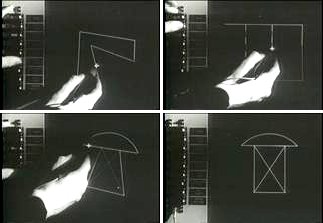
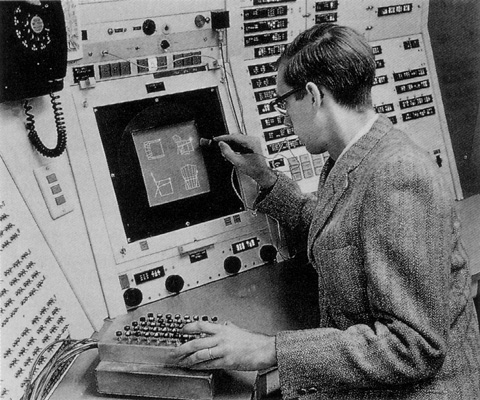
Written in 1963, Sutherland's Sketchpad system and resulting paper revolutionized the field of computer science. Sutherland's work was particularly unique as a new method of computer-human interaction where input was taken in through the newly invented light pen to construct drawings on an special interactive monitor screen. At the time, anything other than textual keyboard input was unheard of. In fact, Sutherland's Sketchpad introduced a completely new idea into the computer science community: Graphical User Interfaces. (You know, just as a side product.)

In addition to simply drawing shapes, Sketchpad enabled the user to establish and manipulate constraints for the lines and objects that were drawn, save those shapes and associated constraints to a library, reuse them through copying, and even merge those shapes and properties to create new classes of objects. In creating a generalized and abstract system for defining objects, Sutherland in-effect created* the modern concept of object oriented programming! Even more impressive is the fact that Sutherland had no language support for defining objects or classes or inheritance or anything like that. By 1963, C, not to mention C++ (C with classes), hadn't even been invented yet. "High level" programming languages like Fortran, LISP, and Algol were relatively new. In his paper, Sutherland clearly indicates the low level nature of the workings of his program when he says things like, "...operations are implemented by short sections of program defined as MACRO instructions in the compiler language..." and "...As parts of the drawing are deleted, the registers which were used to represent them are free." Sutherland also stresses the important of now commonly known benefits of the object-oriented programming paradigm in a section of the paper named, "Generic structure, hierarchies," when he said that, "Without a generic structure it would be almost impossible to add the instructions required to handle a new type of element."
Sketchpad in use
Sutherland using the TX-2
running Sketchpad


Sutherland also touched on gestures for his pen based interface when he mentions that the drawing ends by "flicking" the pen faster than the system can track it. The paper even touches on aspects of graphics and visualization when he talks about line and circle generation, magnification of pictures, and translation of figures.

Sutherland also discussed two very different forms of now common computer usage giving examples of how his Sketchpad system was being used.
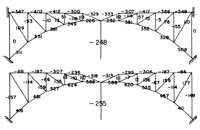
  1. Computer Aided Design (CAD)
    • Since his drawing system could reproduce shapes and create and manipulate systems of constraints, Sutherland used his system as a way of designing bridges within a set of resource and physical constraints.
Bridge made in Sketchpad
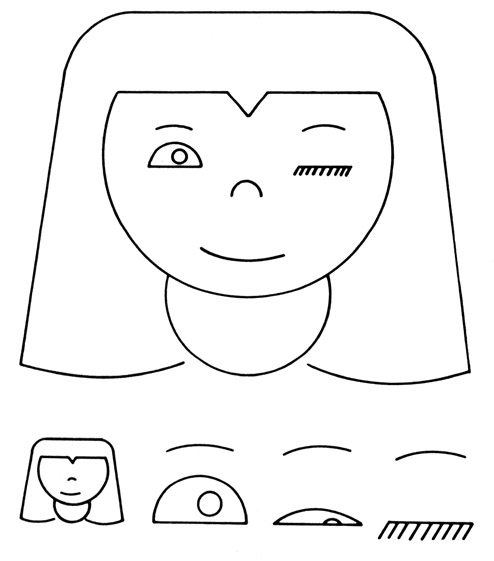
2. Artistic Drawings
    • While our modern society may take creating art through computers for granted in the forms of digital image creation with photoshop, video games through development engines and kits such as Unity3d, or even music through programs like FruityLoops, creating art through computers was almost unthinkable in 1963. Despite this, Sutherland discusses creating animated images.
Artistic drawing "Nefertite"
 and component parts
made in Sketchpad

To top it all off, Sutherland, in discussing future work, casually mentions future applications like direct 3D object creation/manipulation, 2D to 3D object transformations, and some potential work in the yet to be created field computer vision.

For his work with SketchPad, Sutherland has received the Turning Award in 1988 and the Kyoto Award in 2012.

*Ideas similar to object-oriented programming had been around MIT in the field of artificial intelligence, particularly around LISP. Later in 1967, Simula 67 introduced objects as a programming concept.

Cited work:
Sketchpad a man-machine graphical communication system, Ivan E. Sutherland, Consultant, Lincoln Laboratory, Massachusetts Institute of Technology, DAC '64 Proceedings of the SHARE design automation workshop, Pages 6.329 - 6.346, ACM New York, NY, USA ©1964

Thursday, January 17, 2013

(More) About Kanji Storyteller


Compose View
Explore View
I've been developing an educational sketch recognition based program called Kanji Storyteller that acts as a learning space for students of foreign languages. Currently, it only supports Japanese and only recognizes a small set of kanji. When I first started working on it for a Computers and New Media course project, I was working with a group of students from Dr. Hammond's Sketch Recognition Lab and I was pretty dependent on their contributions for the recognizer. I want to improve the recognizer and free myself from dependence on others for future development.

Recognizer Update
We ended up using a template based recognizer that checks sketches against a training set on the fly. It can recognize the symbols but it gets too slow with increasing size of the training set and it tends to be a little too temperamental and unpredictable. As such, I will be converting the recognizer to a gesture based recognition scheme.

  • Gesture/Stroke Based Recognition

Recognizer Expansion
For Japanese, I'd like to expand the recognizer to recognize:
  • 平仮名
    • hiragana - phonetic syllabary
  • 片仮名
    • katakana - phonetic syllabary for words borrowed form other languages
  • ローマ字
    • romaji - Roman alphabet characters
  • 部首
    • bushu - "radicals" - Parts of Kanji
  • Stroke Order and Direction Based Recognition - rejects or notifies when a kanji written in the wrong order or direction
  • More Kanji and Jukugo
Social Connection and Collaborative Learning
One of the major features that I wanted to include was support for networked connections where other students, mentors, instructors, and even spectators could join a session (class, group) and share their ideas and thoughts about the kanji. The shared interaction space would allow the students and other participants to share mnemonics, demonstrate correct stroke order, and collaboratively create scenes that would help reinforce learning. Some classes of participants could be restricted to only observe and comment while other classes of participants could add to the scene annotation and sketch as well as comment. Providing audio support for open dialogue would be extremely beneficial.
  • Host a session (teacher only?)
  • (Sockets?) connect to a session
  • Support Audio Chat
  • Group editing of scene annotation
  • Canvas updates across multiple connected sessions in real time
  • Networked saving and storage of canvas files (xml)
  • Suggest beneficial group behavior
    • mnemonics
    • memorable stories about kanji
    • discuss aspects of kanji
    • make fun/cool stories in the annotations
    • group games (competitive and collaborative)
Gamified Learning Suite
Going beyond character recognition, I would like the application to provide a language learning suite that featured grammar lessons, full sentences, vocabulary drills, and learning games and quizzes. Kanji Storyteller should also keep track of the student's progress in the form of the kanji and concepts that they have encountered and mastered. Making this generic and modular enough to add new languages would be ideal, although there are Japanese specific concepts that would need to be emphasized. (Better to do one thing well than many things poorly.)
  • Grammar Lessons
  • Example Sentences
  • Vocabulary Drills, Learning Games, Quizzes
  • Progress Tracking
    • Kanji Encountered
    • Kanji "Learned"
    • Grammar Concepts Mastered
    • Badges / Achievements
    • Learning Metrics
      • Average Difficulty of Kanji Encountered (Breadth of Knowledge)
        • Grade Level
        • JLPT
      • Average Difficulty of Kanji Mastered
      • Average Time to Recall and Write Kanji
      • Average Time to Complete Drill of N Kanji
      • % recall of Kanji characteristics (Depth of Knowledge)
        • Onyomi, Kunyomi, English Meaning, Jukugo
  • User Profiles Stored on Database
    • User Profile Image
Dynamic Sticker Image Lookup and Related Kanji Image Creation
To provide some variety in the kind of images that can be used for the stickers, I'd like to move away from using a static image library/database and lookup images on the internet dynamically at runtime. This would also reduce the amount of work it takes to add new kanji to the program where only the training set, classifier, and audio would have to be updated. The blue kanji identifier tag on the bottom right of the image would have to be added on the fly too though.
  • Dynamic Sticker Image Lookup
  • Dynamically Create Blue Kanji Identifier Tag
  • Dynamically Create Basic Kanji Image
  • Dynamically Create Basic Jukugo Image
Print Function 
Students and Teachers may want to have a paper printouts of the information for their own records or creations. 
  • Dictionary Panel
  • Canvas
  • Comments Panel (or subset of it)
  • Story Panel (or subset of it)
Miscellaneous
  • Change the layer control button icons to images rather than letters
  • Get rid of the 'flashing' effect when things are moved/updated in GUI
  • Search Function to better search English to Japanese
  • Translate Multiple Stickers at once
  • Move stickers relative to background if size is changed
  • Get rid of 0 value for Frequency of Use column in Database
  • Smarter/Better GUI sizing
  • Have quick dictionary lookup by using kanji that is already on the canvas
Other Languages
At some point, I may also like to expand the whole application to support other languages (but I'm not completely sold on the idea):
  • English
    • Dictionary Panel
    • Roman Alphabet
    • Words
  • Korean
    • Hangul
      • Detecting Syllabic Groupings
      • Detecting Symbols within Syllabic Groupings
      • Detecting Valid Combinations and Arrangements of Letters Within Groupings
  • Chinese (Mandarin)
    • Dictionary Panel
    • Simplified Kanji Set
  • Update and Generalize Menu and Change Menu Options Based on Language
Dictionary Panel - Sortable Search

Dictionary Panel - Kanji Information Card